Faculty and staff cybersecurity training is getting a makeover and moving to a new platform starting with the July 2025 quarterly training.
In collaboration with the Center for Innovation in Teaching and Learning, we have created new required and optional modules that will be presented using eText, which delivers materials with multimedia, notes and assignments embedded directly in context.
What will be new?
“Having an in-house training platform lets us tailor our training to be relevant to the university rather than relying on more general content,” explained lead cybersecurity training specialist Cindy McKendall. “We can customize and show real world examples such as ransomware lock screens or phishing messages.”
Taking training via eText is convenient. You can install the eText app on your desktop or smart phone or use a browser.
What will remain the same?
The training team will continue to develop modules based on user feedback. “We collect feedback each year and use it to improve what we present to campus,” McKendall said. She added that staff and faculty will continue to receive quarterly email reminders containing a link to the Training platform (now eText) where you will sign in using your university login and password. Training will still be easy to complete, usually taking less than 15 minutes.
What to know about changes to the campus VPN login
We are adding an additional layer of security to the VPN to protect the university. There have been a number of targeted attacks against higher education institutions where their VPN was used as a means for unauthorized access to systems and information.
There are two main changes to note:
If you already use the Duo app for multi-factor authentication, you will begin using it to access the campus VPN as well. You will be prompted to authenticate each time you connect to the campus VPN.
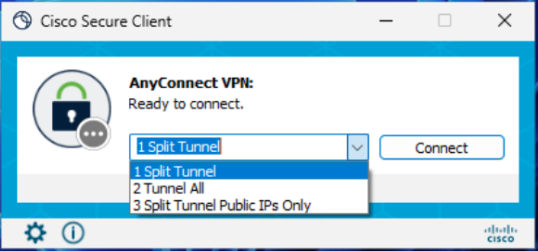
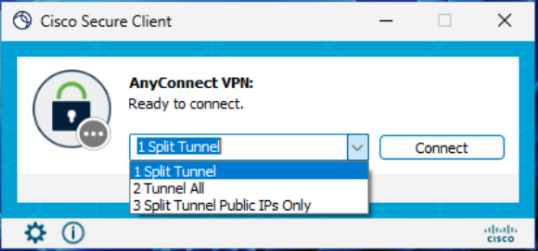
You will see fewer options in the drop-down menu.
Neither of these changes affect VPN functionality.
Logging in for the first time on or after March 12
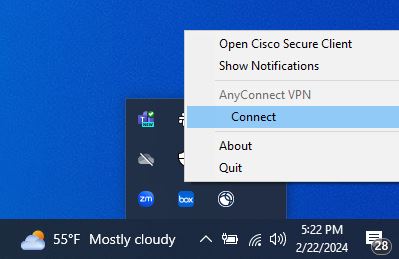
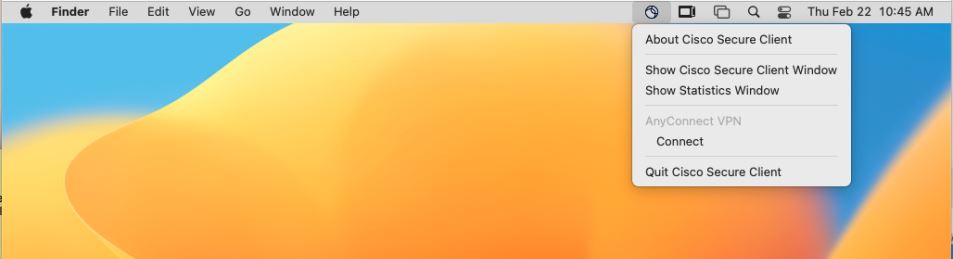
1. Open the Cisco Secure Client (formerly AnyConnect) app.
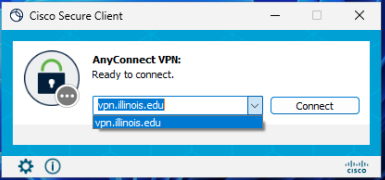
2. Type or select “vpn.illinois.edu” and click “Connect”.
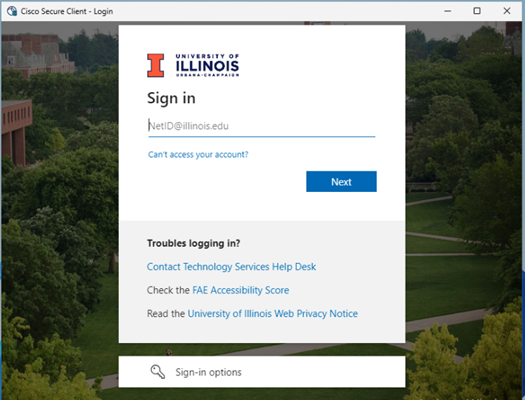
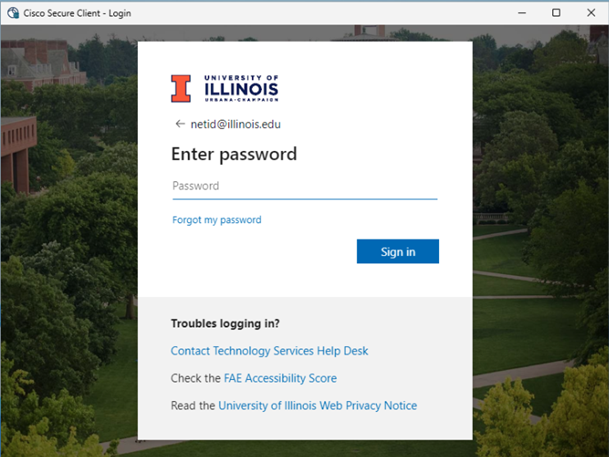
3. Enter your university email, followed by your password.
4. If you are NOT enrolled in Duo, you should connect to the campus VPN at this point.
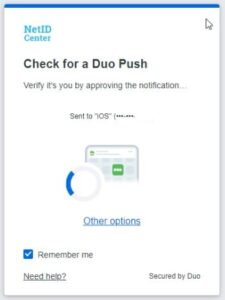
5. If you use Duo to authenticate for other campus applications, you will be prompted to do so each time you access the campus VPN. Complete Duo authentication as you would with other applications.
6. Once you authenticate with a passcode or push notification, you should be connected to the VPN.
NOTE: On your first login on or after March 12, you automatically will connect to the VPN with the Split Tunnel option by default. If you wish to use another option, just disconnect and reconnect.
On your second login and for all further logins, you can select from any option on the drop-down menu and click “Connect”.
How do I know which VPN option to choose?
Your goal
Screenshot
Best VPN option
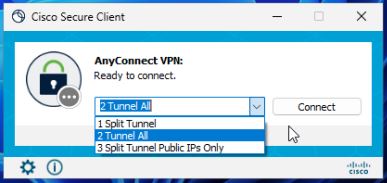
If your only goal is to access campus resources
1 Split Tunnel
If your goal is to access off-campus resources as if you are on-campus, select the “Tunnel All” profile. This will also allow you to access campus resources.
2 Tunnel All
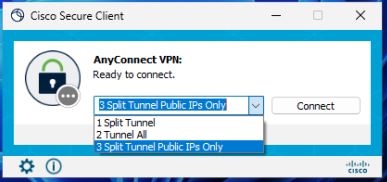
If your goal is to access campus resources, but you are at a location that uses the same private IP space as Illinois, select the “Split Tunnel Public IPs Only” profile. (If you are not sure what this means, you can safely ignore this profile option.)
3 Split Tunnel Public IPs Only
If you are unsure which profile to choose, select the “Tunnel All” profile.
2 Tunnel All
VPN Login FAQ
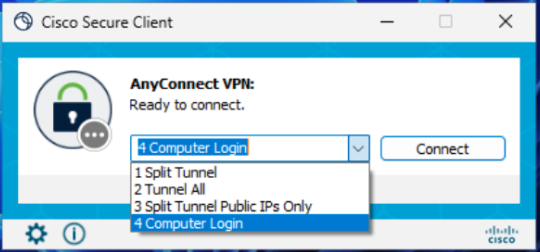
I have FOUR options on my AnyConnect VPN menu. What is the fourth used for?
Computer Login should only be used in situations where you are attempting to connect to the VPN beforelogging in to your computer.
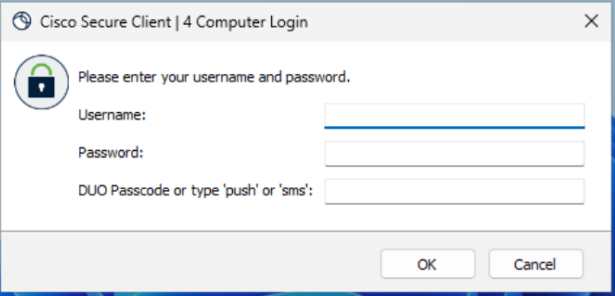
When you try to connect using the “Computer Login” profile, you will see a username prompt, a password prompt, and a Duo passcode prompt. Enter your NetID as your username and your campus password in the password prompt. In the Duo passcode prompt, enter the word “push”, “sms”, or your Duo one-time passcode.
I use the OpenConnect Client. What steps should I follow?
If you are not sure what the OpenConnect client is, you can safely ignore this section.
The login process for those who use the OpenConnect client, whether from the command line, a graphical desktop, or through NetworkManager, differs from the Cisco Secure Client process. Beginning on March 12, those who use the OpenConnect client will have to connect to specific VPN profiles that begin with the word “OpenConnect”.
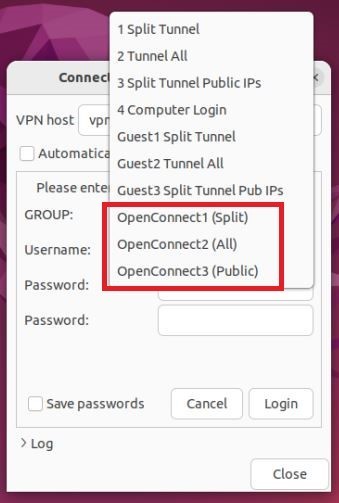
The VPN profile “OpenConnect1 (Split)” is the OpenConnect equivalent of the “Split Tunnel” profile.
The VPN profile “OpenConnect2 (All)” is the equivalent of the “Tunnel All” profile.
The VPN profile “OpenConnect3 (Public)” is the equivalent of the “Split Tunnel Public IPs Only” profile.
Open Connect with Graphical Interface
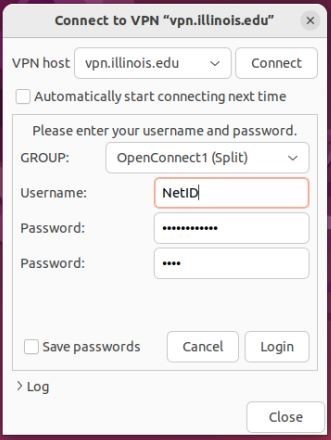
If you use OpenConnect through a graphical interface such as Ubuntu Network Manager, connecting to the VPN is a four-step process:
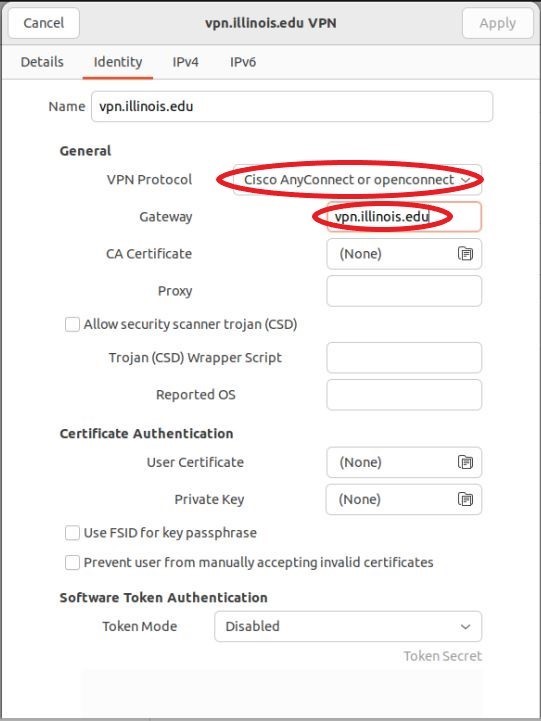
Configure your OpenConnect client to use the following settings then click “Apply”.
VPN Protocol: Select “Cisco AnyConnect or openconnect”
Gateway: vpn.illinois.edu
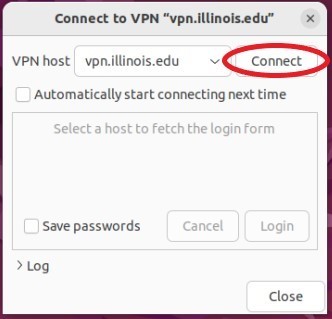
From the Network Manager interface, select the VPN you just configured and click “Connect”.
From the “GROUP” drop-down menu, select one of the “OpenConnect” options.
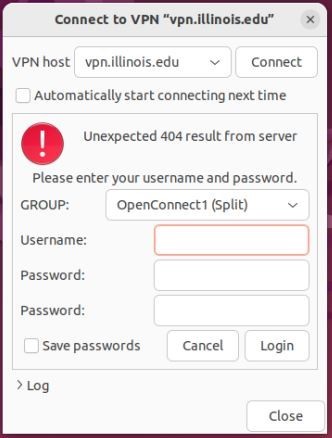
In the “Username” prompt, enter your NetID.
In the first password prompt, enter your campus password.
In the second password prompt, enter the word “push”, “sms”, or a Duo one-time passcode. Then click “Connect”.
When you connect, you may see an error that says, “Unexpected 404 result from server.” This error is expected and can be safely ignored.
OpenConnect with Command-Line Interface
If you use OpenConnect from the command-line interface, connecting to the VPN is a three-step process:
As the root user, invoke the openconnect command with the “-b” flag and “vpn.illinois.edu” as a positional argument:
When presented with a “GROUP” list, enter one of the following three options:
“OpenConnect1 (Split)” for Split Tunnel
“OpenConnect2 (All)” for Tunnel All
“OpenConnect3 (Public)” for Split Tunnel Public IPs Only
You will then be prompted for your username and two passwords. Use your NetID as your username and your campus password as the first password. In the second password prompt, enter the word “push”, “sms”, or your Duo one-time passcode.
When you are done using the VPN, you need to end the OpenConnect client process with a command such as “sudo pkill -SIGINT openconnect”.
Technology Services is building a culture of greater awareness and understanding surrounding data privacy at the University.
Since 2020, Privacy at Illinois has hosted the Privacy Everywhere conference. This year’s conference participants were able to benefit from sessions about privacy engineering, online advertising and privacy, sharing best practices among Big Ten universities, and others.
Privacy thought leaders shared expertise and experience and fueled thought-provoking conversation. Here’s some of what they covered.
Your data on the auction block: what it means for you and national security.
You may have a general idea that your personal data is collected when you interact with a company online. You may even know that your data is frequently sold for marketing and research purposes, but you may not know the extent to which that information about you is being shared and re-shared; sold and resold. Further, you may not understand the breadth of data points available about you.
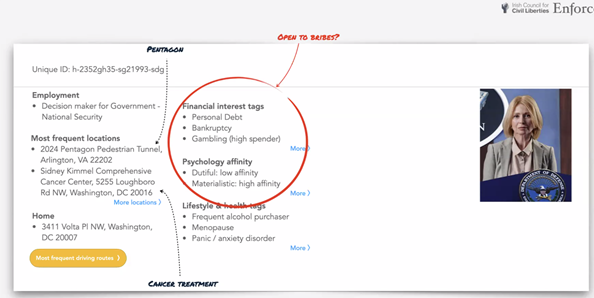
Privacy activist Dr. Johnny Ryan is a Senior Fellow at the Irish Council for Civil Liberties and Senior Fellow at the Open Markets Institute. He provided insight into the path your data can take when you use the world’s largest and most popular search engine to make a routine online purchase.
Ryan showed that some of the data points available in the marketplace through a process called Real Time Bidding have not only personal but national security implications. Information he was able to see—that data brokers can easily obtain—include whether you work for a government agency or for a company that builds systems or products for the government. Data is also available about your financial status—debts, child support owed, etc. A bad actor with both those data sets or other potentially embarrassing or compromising information might have leverage over an individual they wish to blackmail in exchange for sensitive government information. Adding an additional layer of complexity to the already complicated real time bidding process is that many data brokers are individuals or companies based in China or Russia.
He is presently advocating with the European Union to limit or eliminate the availability of this type of data on the open market.
AI and large language models are here with privacy implications we should know about.
Jay Averitt, a Senior Privacy Product Manager at Microsoft, and Saima Fancy, Senior Privacy Specialist at Ontario Health, shared their perspectives about privacy implications in the new world of AI.
They touched on the speed with which Large Language Models (LLMs) have appeared on the scene. Averitt said that they have just come in a whirlwind and that data privacy is a huge issue with the amount of data going into these models. Fancy posited that LLMs are being released prematurely. “There is a lot of hallucination in the output. In the health sector, people are putting personal information into it not realizing that the data will sit with the LLM and will be used for further LLM training. We have not had time to educate people because they are coming out rapid fire,” she added.
Averitt noted that social media poses an interesting set of issues and there is a tradeoff. “Maybe you don’t have to have absolute privacy because there are some good aspects to social networks. It can be about striking a balance. How much privacy do you want to give up for the product?” he said.
Fancy echoed those sentiments and added that everyone should recognize that privacy is a fundamental human right you need to protect. “Even if there is some info available about you already, you don’t need to add more. Be your own advocate. Balance your interests with the interests of your family. We don’t have to open our entire book, she explained.”
Averitt and Fancy also discussed how we must come up with solutions to protect data being shared with LLMs. “Maybe we ensure we are not storing the prompts or training the models? If that model needs that data, we should use anonymized data to train it,” Averitt suggested.
Fancy pointed to the EU’s General Data Protection Regulation (GDPR) as an example for privacy protection. “GDPR allows individuals to reject being subjected to automatic decision making. North America needs something like GDPR,” she explained.
Averitt agreed and mentioned that we are playing catch up in the U.S. “I look at whether we are collecting data the right way, storing it the right way. It is about poor data collection in the AI space. It would be great if the AI boom would help get a federal privacy stature in place in the U.S.,” he said.
The more we know about what happens with our data, the more power we can have over it and its use. Here are takeaways you can use to actively engage with data privacy.
Personal – Your data is up for auction over and over. Familiarize yourself with how and when your personal data is used by companies and organizations you interact with online. Understand the tradeoffs involved in these interactions. By sharing certain data, you may be giving up some privacy for the sake of convenience.
Professional – AI is here and it is changing at a pace that U.S. privacy regulations have not matched. Baking privacy into AI programs upfront will enable and improve both the AI program and individual’s privacy. Until then, either avoid adding your personal data into AI systems or make informed decisions about the data you do share. Ensure you have the authority to use AI for sensitive or high-risk data, especially personally identifiable and health information that is not your own. These systems use the data they receive to train on. More dialogue is needed in higher education about best practices with AI and how it can beneficially assist individuals in their learning goals while maintaining privacy principles.
Privacy professionals and researchers are your advocates for better transparency and trust. Privacy at Illinois aims to make data privacy top of mind. As software and AI investments come up for purchase and review, the privacy team encourages vendors and developers to take a privacy is baked into the product and process approach.
Privacy engineering envisions privacy as a competitive and strategic advantage to drive true innovation in a digital and data driven world. Privacy engineering incorporates technical design and architectural privacy into software development, data projects, and technology. It vastly increases protection of private and personal information – often by not collecting personal details or by highly limiting how sensitive/personal information is collected, processed, stored, and used.
Thinking strategically about data management can make data available that previously might not be, but in a principled way. Learn more about privacy policies and practices and how Illinois privacy professionals can help with in your work at Illinois.
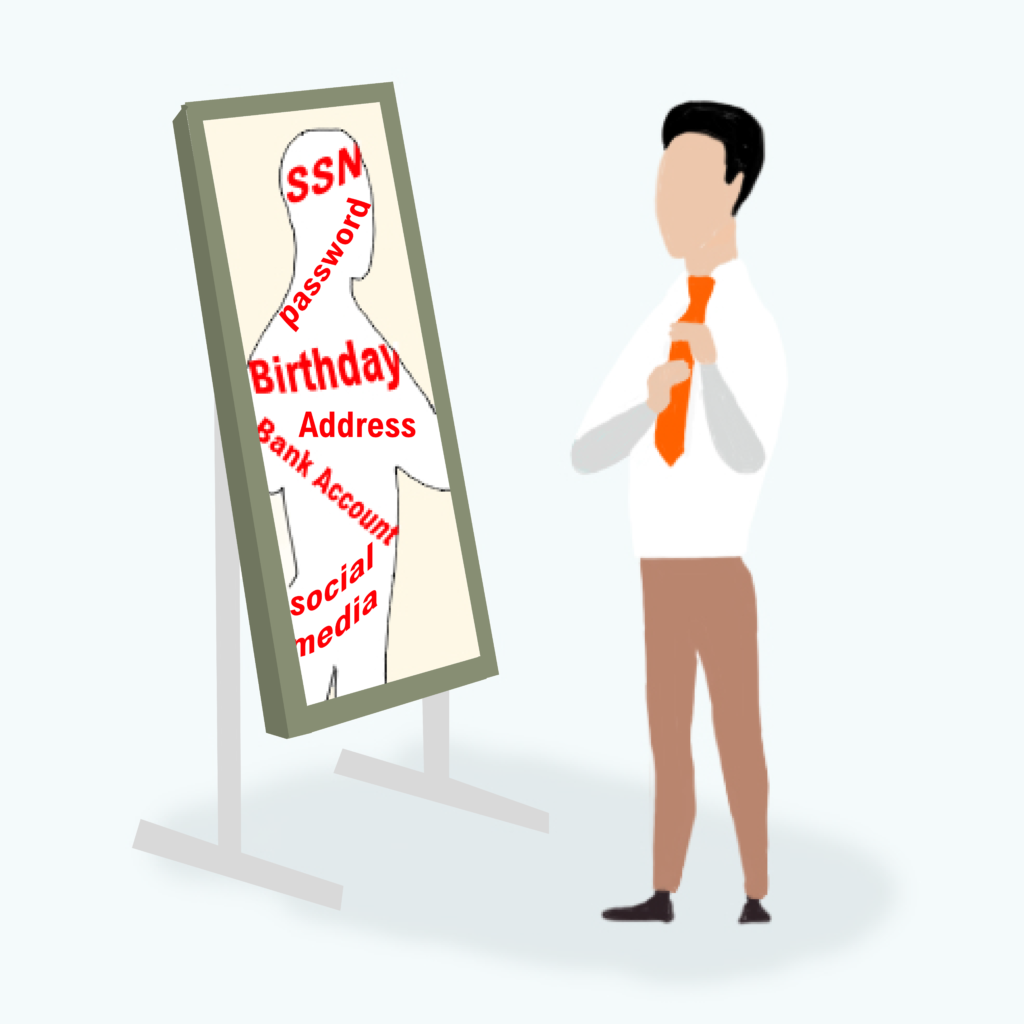
Your data represents you. It is made up of snippets of information about you–everything from your location to your interests to your finances. Ultimately, this data can be aggregated to create a clear picture of your behaviors and beliefs and used in unexpected ways to inform decisions.
The University of Illinois takes steps to protect the data you have shared and created in the course of your time as a student, faculty member, researcher, or employee.
Technology Services is helping to lead University efforts to develop and define privacy policy. A set of privacy pillars guides the work.
Trust – Individuals should be able to trust that the university handles their data with the utmost care and protection.
Transparency – Individuals should be notified and understand how the University collects personal data, and for what processing purpose(s) the data is collected.
Consent – Individuals should be able to freely consent or withdraw consent wherever practical, and especially when consent is used as the legal basis for collecting and processing personal data.
These guidelines also can help you as you consider your data privacy outside the university. Making informed decisions about your data is a key way you can safeguard your privacy, according to Associate Director of Privacy Phil Reiter. He explained that when you interact with an organization or business you can ask yourself some key questions:
Do they provide clear and understandable information about how your data is collected, processed, and shared? For example, do you know what they will do with your data and why they want it in the first place? Are you able to ask that your data be removed or that they stop collecting it if you change your mind about sharing?
According to Reiter, the European Union takes a human-centered approach in this space. As one example, you may have heard about some of the privacy rights available to residents of other countries, such as the right to be forgotten, where you have the right to request your data be deleted, and the law says the organization keeping the data must comply with your request.
“We’re seeing an emergence of comprehensive privacy law here, but often at the state level. The U.S. also focuses on sectoral law, like the health sector or financial sector, rather than comprehensive privacy law. This can lead to complexity and a patchwork that leaves large gaps or fails to mature overall privacy rights,” Reiter said.
What can you do in the meantime? Reiter suggests that while it may seem cumbersome, your privacy is important enough to take time to know what you are agreeing to.
“So much of our lives is conducted online. It’s natural for us to want to use the most convenient app, website, or AI to make our lives easier. Balancing that convenience by being informed about the personal information the app or site collects about you is important. We must play an active and informed role in the data collected about us in order to make decisions in our own interest,” he suggested.
Where can you learn more?
The University has information about privacy that includes a growing privacy guide to university data that provides information about how your data is collected and used. See it here: Privacy Guide to University Data
Privacy issues are complex and affect everyone. To learn more about the wider privacy landscape, Reiter and members of the privacy team suggest the following organizations:
Whether you like to grab the best online deal on Black Friday and Cyber Monday, or your tastes run to making an online donation on Giving Tuesday, shopping online during the holidays is fast and simple. But it can come with some dangers if you aren’t watching for red flags.
Online scammers use all sorts of methods to distract you from signs of their deception. Here are some tips and suggested actions from the Cybersecurity Training and Awareness team at Technology Services.
Check a seller’s reputation before sending them payment or personal information. For online stores, you can search for the website along with the terms “complaint” or “fraud” or check the Better Business Bureau. Also, check the seller’s return and refund policy for anything suspicious, like high restocking fees or shipping costs.
If buying on social media, verify whether a seller is reputable by checking their posts and activity history. If you discover an account that hasn’t posted anything in years and is suddenly selling electronics at incredibly low prices, scammers have likely taken over the account.
Think twice if a seller only accepts payment by gift card, wire transfer, or cryptocurrency. These payment methods are a prime scammer tactic, as it is usually impossible to recover your funds in cases of fraud. According to the Federal Trade Commission, credit cards offer the best consumer protection when shopping online.
To protect your online donation, be sure to visit a charity’s official website and also check them out before giving at Give.org. A legitimate charitable organization will have documented history of actual good done and will demonstrate what donations are used for.
Using high pressure tactics, whether you are buying or donating, can also be a warning sign. Scammers may create a sense of emergency and play on your emotions and may use time sensitive pricing to get you to buy now.
Last month, Technology Services was a presence all over campus at events that demonstrated how to avoid phishing and the real-world consequences of getting hooked.
October is Cybersecurity Awareness Month and Technology Services reaches out to the wider university annually with activities that grab your attention and impart a message. This year included games, rewards, and chances to exercise both creativity and teamwork.
“As tactics get more sophisticated and we are bombarded with more and more messages, it’s important to understand how cybercriminals use trusted technologies and our own emotions against us to gain access to data, passwords, and credentials,” explained Lead Cybersecurity Training Specialist Isaac Galvan.
Phish Market – keeping you off the hook
Aimed at students, the Phish Market featured games like you’d experience at a community fair. Participants answered questions about phishing and played for prizes.
Galvan estimated that more than 100 students came through the Digital Computer Lab on October 4 and tried their hand at Phish Phootball, spun the Wheel of Phish, took selfies with costumed staff, and played other carnival games.
Students nowadays are digital natives and might think they have the upper hand when it comes to technology, that they can’t get tricked. But phishing is more than the delivery method, according to Galvan. “Whether it’s sent in email or via text, a lot of what makes for successful phishing is the bad actor getting you to bypass red flags or succumb to emotional pressures. Reminding students to slow down and think before acting in our fast-paced environment is part of what we shared at this event,” he explained.
Haiku Contest – cybersecurity in just 17 syllables
Anyone at the university was encouraged to submit either original or AI-generated haiku poetry with a phishing or cybersecurity theme.
“The judging panel had a great time reading through more than 70 submissions and it was hard to select favorites to showcase to the campus community,” said Cybersecurity Training Specialist Sandy Bone.
“One of the best parts about the contest was that the haikus demonstrated creativity and quite a lot of cybersecurity knowledge in very few words. Haiku only allows for 17 syllables,” she added.
Technology Services provides cybersecurity for both the UIS and UIUC campuses, and there were facilitated in-person escape rooms at both locations. Teams of 4-5 worked their way through a packet of clues and used deductive skills to “save the barnyard.”
“This is another very engaging learning tool in our toolkit. We’ve adapted it from Indiana University’s original version, and it’s been well received each time. When a small group can successfully complete this challenge, it helps people to know they have the knowledge needed to spot and avoid phishing when it comes their way in real life,” Galvan explained.
Haunted Phish Market – a second chance at phishing fun
Taking advantage of the tradition of handing out candy on Halloween, staff set up at the Campus Instructional Facility on October 30 to reprise the Phish Market; this time adding candy giveaways to the prizes as a bonus for participation.
“We engaged with more than 300 people that day and it was a fantastic way to wrap up the month,” said Bone.
The learning continues year-round
Technology Services’ charge includes increasing the number of individuals at the University who regularly receive cybersecurity training. This type of outreach expands upon what the team does with scheduled in-person and online trainings.
Good cybersecurity practice is a two-sided coin, according to Galvan. “The University uses the best tools and has a team of professionals protecting our systems and data. And there are thousands of employees and students who can help increase that protection by putting what they learn in all our training venues into action,” he said.
When you don’t really notice notices, you risk letting scammers in.
Many of us enable notifications on our smartphones so we know when new information arrives. It can be great to stay on top of the latest news or your friends’ upcoming activities.
Enhanced security protocols such as multi-factor authentication (MFA) for your bank account or for university resources use the same push notification tools. Notifications can be set up on your device to quickly tap and be allowed in.
When you become overwhelmed by all the noise, you are at risk of missing out on clues that tell you a request is from a scammer hoping to steal your credentials.
As explained by Isaac Galvan, Lead Cybersecurity Training Specialist in Technology Services, MFA fatigue is when a cybercriminal floods you with approval prompts in the middle of the night or randomly throughout the day. “The cyber-criminal hopes to fatigue you with endless notifications so you get tired of them and, in frustration, approve one,” he said.
Keep the following in mind to help avoid these MFA scams.
Timing is everything.
When a notice appears, does it coincide with when you are visiting a website or using an application? Manager of Identity and Access Jeremy Watson explained that you should not click or swipe unless you are actively using an application. “If you are awoken at 3:30 a.m. because of repeated texts or notifications, be concerned. You are NOT trying to login to your account while fast asleep, so do not click,” he said.
Only approve Duo prompts you initiated by logging in with your password and keep generated passcodes secret from everyone.
We won’t call you to approve anything.
When a cybercriminal has an account’s password, they also need to get past the MFA protection. Cyber-criminals can try to catch you off guard by impersonating a university official or IT staff member. Galvan added that a help desk or IT staff member “will never ask you to approve an MFA prompt or generate a passcode,” Galvan explained.
He recommends you change your password if you get suspicious Duo prompts that you didn’t initiate or receive phone calls asking you about multifactor authentication. This is a sign that someone else may have your password.
You can get notified of unapproved access.
Watson suggested you check your MFA settings for old or unrecognized devices and phone numbers. While you’re there you can set up a default approval device, so you get prompted when your password has been used to log in. You can change your password and update your MFA settings in the NetID Center at https://identity.uillinois.edu.
When you think of an insider you might think of someone “in the know” or part of a select group. You also may think of the term in relationship to the world of finance. Insider trading is illegal, and it makes headlines when it happens on a large scale.
You likely don’t consider yourself an insider, yet you are. As a member of the University of Illinois community (or any organization), you have access to at least some networks, systems, or data. Whenever a person has the potential to cause a cybersecurity incident or a data breach-even unintentionally-it is known as an insider threat.
Often cybersecurity incidents due to insider activity happen by accident. What seemed an innocent action resulted in an unintended consequence.
Earlier in 2023 a disciplinary investigation was launched at an international company stemming from an employee allegedly sharing private information. The individual transcribed a recorded meeting with an audio-to-text application and then entered that transcription into an AI tool to create meeting notes. [SOURCE: Samsung employees allegedly leak data via ChatGPT (cshub.com)]
What’s the cure? Be cybersecure.
Taylor Judd, Manager of Cybersecurity Infrastructure and Engineering with Technology Services, offers some simple actions you can take to reduce the chance that YOU become an insider threat.
Out with the old.
Anytime you re-share or share something, review the existing permissions, and remove those that no longer apply. Get rid of old equipment, forms, and cloud storage. “You have your spring house cleaning; do a fall clean of your digital life both professionally and personally. Old data can still be exploited even if it’s not used actively,” he said.
When in doubt: report.
The cybersecurity team is here to help and appreciates any reports of suspicious digital activity to security@illinois.edu.
Judd also suggested carefull consideration for requests to share. Double check unusual requests or messages using a separate communication method, like a known email address or trusted phone number. “If something sounds off, take time to independently confirm that it’s legitimate,” he advised.
Keep sensitive information secure.
“One way is to avoid putting sensitive information into ChatGPT or another AI platform. Another way is to lock your computer or device whenever you’re not using it,” Judd said.
On a Windows computer, press the Windows key plus the L key (for Lock) on your keyboard at the same time. To find the Windows key, check near the space bar for a key that looks like the Windows logo.
Guard the physical security of your space.
When an unauthorized person closely follows someone else who is authorized into a restricted area it’s called tailgating, and it can pose a security risk.
• Ask coworkers to scan their own i-cards so there is a record of who enters secured areas. This helps with safety, such as in case of a building fire. • Be cautious about holding the door for visitors, including delivery people. • Close doors securely behind you.
Watch for more cybersecurity tips throughout the 2023-24 academic year.
Individuals with malicious intent are all over the internet looking for ways to reach you and get something they want: money, data, information. We can read daily about harmful scams, identity theft, phishing, and ransomware. What’s the cure? You!
When you actively work to secure your digital life, you become less of a target. You can close or lock doors once open to bad actors with simple actions.
Generative AI refers to artificial intelligence models that create content in various forms, including text, images, and audio across many formats and mediums.
Generative AI uses deep-learning algorithms and training data to produce new content that approximates the training data.
Given the incredible rise in popularity and the transformative nature of Generative AI, following is some general guidance to consider related to data privacy. Note: not legal advice, and not intended to be comprehensive.
If you use generative AI in regular work
Explore options to purchase or license a business or enterprise version of the software. Enterprise software usually brings contractual protection and additional resources such as real-time support.
Begin discussions with your colleagues about the privacy considerations listed in the next section.
Consider where and how existing policies and best practices can be updated to better protect user privacy.
Remember to validate the output of Generative AI, and if using Generative AI in a workflow, consider implementing formal fact-checking, editorial, and validation steps to your workflow.
If you create or develop generative AI
Provide transparency about how your Generative AI models are trained. Inform users what data might be collected about them when using generative AI and create accessible mechanisms for users to request data deletion or opt-out of certain data processing activities.
Explore incorporating privacy enhancing technologies in your initial design stages to mitigate privacy risks and protect user data. Consider technologies that support data deidentification and anonymization, PII identification and data loss prevention, and always incorporate principles of data minimization.
If you would like assistance as you consider data minimization, data anonymization, or data deidentification in your AI, the Privacy Team can help. Contact privacy@illinois.edu.
Additional guidance
Generative AI is not new, and concerns regarding its use and potential harms have been raised and discussed for years.
In light of the recent popularity and public access to generative ai capabilities, it’s important to remember there are existing policies and practices, as well as scholarly, historical, and theoretical applications that should be considered alongside the more recent conversations. Initiatives involving personally identifiable information (PII) at the university, including generative AI, are subject to all applicable laws, university policies, and university contractual obligations.
In the university setting, specific privacy laws that come into consideration include the federal U.S. Privacy Act as well as state privacy laws such as PIPA, industry specific regulations such as FERPA, HIPAA, COPPA, and geographic and extraterritorial international laws such as GDPR and PIPL, among others. For more information about these laws and others, see the Electronic Privacy Information Center’s guide. Given the unprecedented access to and increasing adoption of AI and generative AI capabilities, market forces are driving steep competition to add AI capabilities to existing offerings. This pressure may result in compromised ethics and integrity when rushing new features and new capabilities to market.
Training data may include data that was collected in violation of copyright and privacy laws, among other laws or ethical considerations, which may contaminate the model and any products that use it.
Training data refers to the initial structured and unstructured data (databases, text, video, books, websites, blogs, etc.) used to train machine learning algorithms. We will not know the societal and business impacts of these violations for many years.
Identifying and removing personally identifiable information (PII) from large language models is largely untested and therefore may complicate responding to data subject requests within regulated timeframes. Additionally, if PII is a part of the large language model it may be possible for generative AI to expose PII in the output.
It is likely that input data may be used as training data, and users are more likely to overshare when data collection is interactive and conversational.
Users may lack technical literacy to understand that Generative AI is mimicking human behavior.
Users can be intentionally misled to believe they are interacting with a human.
Given the prolonged and conversational method of interaction, users may lower their guard and share personal information.
It is unclear what personal information, user behavior, and analytics are being recorded and retained, or shared with third parties.
As generative AI is mainstreamed, it is likely to follow proven channels for monetization, such as using personal data for targeted advertising. Clear policies should be established regarding the retention and deletion of user data collected during interactions with generative AI systems. When considering uses, determine whether individuals may request deletion of their personal data, which is a requirement of GDPR and most other privacy laws.
Depending on how they’re used, generative AI models may qualify as automated decision-making, which creates heightened privacy and consent obligations.
Under the GDPR, individuals “have the right not to be subject to a decision based solely on automated processing, including profiling,” that has legal or similarly significant effects (GDPR Article 22(1), PIPL Article 73).
Privacy laws in Colorado, Virginia, and Connecticut give individuals the right to opt out of personal data processing for purposes of profiling.
Given the prolonged and conversational interaction of many chatbot-based Generative AI solutions, special care should be taken to minimize legal and privacy risks related to wiretapping.
Risks arise in many possible implementations, including under federal and state wiretap laws. The extent of the risk largely depends upon what information is collected and who has access to the information, so properly configuring the Generative AI solutions with these risks in mind, including incorporating appropriate notice and consent language, is essential. To mitigate these risks, any implementation of a Generative AI service should be reviewed by University Counsel and the University Ethics and Compliance Office.
Generative AI models can be susceptible to adversarial prompt engineering, where malicious actors manipulate input to generate harmful or misleading content.
Malicious prompt engineering may lead to the dissemination of false information, the exposure of sensitive data, or inappropriate collection of private information.
Implementation of Generative AI should be transparent for users and be accompanied by training and educational programming.
Educating users about how AI models work, the data they collect, and the potential risks involved can empower individuals to make informed decisions and take necessary privacy precautions when engaging with such technologies. Promoting AI literacy within the University community is crucial to assist in understanding the privacy implications of interacting with Generative AI systems.
Generative AI systems have the potential to generate content that may inadvertently or intentionally defame individuals or organizations.
Vigilantly implement measures to prevent the generation of defamatory content, such as robust content moderation, human review and editing, and filtering mechanisms.
Clear policies should be in place to address and rectify any instances of defamation that may arise from the use of Generative AI systems, ensuring accountability and protecting the reputation of the University and our communities.
Generative AI systems have the potential to generate false, misleading, or inaccurate content.
Users should be aware the output created by generative AI may not be accurate or true. These models do not evaluate or analyze outputs for accuracy in fact or substance. Instead, they s evaluate outputs on the similarities to the training data they are built upon.
Technology Services staff sat down with new Deputy CIO and Chief Information Security Officer Kim Milford to learn more about her background, strengths, goals, and a bit about her personality.