Select different option instead of SMS for Multi-Factor Authentication

If you use SMS passcodes when signing in to university resources with Duo, you will need to select a different option.  

SMS passcodes are the least secure option when using Multi-Factor Authentication and the university is removing the SMS (text) option for the Illinois campus beginning July 14 to help better protect university resources from cyber criminals. MFA also helps protect personal information, such as access to direct deposit. 

Jump to a tutorial video.

What you need to do: 

Determine whether you will use the Duo mobile app on a tablet or smartphone or use a token (key) that you plug in to your PC or laptop.

  • If you select the Duo app option, download it and install it on your smartphone or tablet.
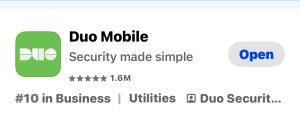
What is looks like to choose the Duo Mobile app in your app store.
  • If you select the token, you can obtain one from the WebStoreActive faculty and staff should first reach out to their college or unit IT support staff to determine whether their department has specific instructions for acquiring a token. 

Once you have the token in hand or have the app installed you can change your second factor as registered in the NetID Center to your new option.  

  1. Visit the NetID Center and select manage my 2FA. 
  2. Follow the instructions in this Answers KnowledgeBase article to make a new selection.  

Video instruction

FAQ

This FAQ answers more questions about discontinuing SMS passcodes.

Privacy Everywhere Conference: Pioneering Human Centered Data Practices in Higher Education

The Privacy Everywhere Conference, held at the University of Illinois Urbana-Champaign, brought together experts to discuss the critical issue of data privacy. The conference explored a human-centered approach to privacy, balancing innovation with privacy rights and ethical data use. Attendees gained valuable insights into privacy principles from legal, ethical, and industry perspectives, equipping them to implement human-centered privacy practices in higher education and beyond.

Conference organizer Sheena Bishop was thrilled with the level of participation and quality of the presentations, which continue to improve year over year.

“Attendance had a bump this year, with more than 580 registered individuals from across the Big Ten and other universities,” Bishop said.

The current landscape of data privacy

Debbie Reynolds, “The Data Diva”, provided an in-depth look at the evolving landscape of data privacy, emphasizing the growing concerns and expectations of individuals regarding their personal data. She highlighted that a significant majority of individuals desire more control over their personal data. According to the World Economic Forum, 74% of people want greater control over their data, while 79% of consumers are concerned about how companies use their information (InfoTrust). Organizations that prioritize privacy see a 20% increase in customer satisfaction, and 75% of students believe they should control how colleges use their data (Cornell University Business).

Reynolds shared real-world examples of successes and failures in data use. Successful initiatives include privacy-preserving data sharing for research, transparent student data use, and robust cloud data cybersecurity practices. On the other hand, failures such as unauthorized data collection, invasive proctoring tools, and insecure data storage highlight the ongoing challenges in maintaining data privacy.

As innovation accelerates, Reynolds stressed the importance of aligning data protection strategies with technological advancements. Key focus areas include clearly defined data purposes, tracking data lineage, managing the data lifecycle, and ensuring accountability in data handling practices. She also discussed the unique privacy challenges faced by universities due to the diverse range of sensitive data they collect, and the multiple stakeholders involved.

Reynolds emphasized that prioritizing privacy builds trust, effective data strategies go beyond compliance, ethics should guide data use, and privacy is integral to human safety.

Avoiding the creepiness factor with human-centered privacy

Rachel Switzky, Director of the Siebel Center for Design, explored the fine line between convenience and creepiness in technology and how human-centered design can foster trust.

Switzky began with a game called “Convenient or Creepy?” She presented scenarios such as a phone knowing your exact coordinates, a voice-activated assistant promoting pizza companies after overhearing a conversation and using your palm to pay for groceries. These examples highlighted the delicate balance between helpfulness and invasiveness in modern technology.

She emphasized that crossing the line into a creepy experience often stems from a lack of transparency and control. Switzky outlined the characteristics of a human-centered experience, which empowers users with control over their data, ensures transparency, collects only necessary data, prioritizes ethical practices and maintains strong security.

She detailed the human-centered design process, which involves understanding, synthesizing, ideating, prototyping, and implementing. A case study on the development of the University of Illinois’ first student app demonstrated the practical application of this approach.

Switzky invited attendees to continue the conversation on designing for trust, underscoring the importance of human-centered design in creating technology that respects privacy and fosters trust.

Educational Technologies and Data Privacy

Easton Kelso, a senior undergraduate researcher at Arizona State University studying Computer Science, shared insights on the intersection of educational technologies and data privacy. Kelso and colleagues’ research revealed that educational technologies, which faculty and staff are often required to use in the classroom, can be at odds with student data privacy.

Their team gathered data from IT professionals, chief information security officers, and university policymakers across the U.S. It became clear that higher education institutions face numerous challenges with data privacy when trying to keep pace with technological advancements. Protecting the data collected by these tools is crucial, as data breaches and misuses can have serious security and privacy consequences, particularly for students, who are often required to use these tools.

Kelso’s team conducted a semi-structured interview study with participants in EdTech leadership roles at seven HEIs. The study uncovered the EdTech acquisition process in the HEI context, the consideration of security and privacy issues throughout that process, the pain points in establishing adequate protections in service contracts, and the struggle to hold vendors accountable due to a lack of visibility into their systems.

In a separate study, the ASU researchers noted gaps in the auditing and approval processes for educational technologies at both the college and K-12 levels. Despite privacy concerns, instructors continued to use unsanctioned technologies due to ease of use, cost, and accessibility.

More research into educational technology use and acquisition will help uncover ways to better align the needs of instructors, students, and institutions when looking at data through a privacy lens.

As privacy concerns continue to grow, the insights shared at this conference will be key to shaping the future of data privacy in higher education and beyond, noted Bishop.

“I look forward to using what I learned at this year’s event and am especially excited that we had such a wide range of individuals who want to make privacy considerations part of their work as well.”

Members of the university community can look forward to the next Privacy Everywhere conference from the Office of the CIO in January 2026.
Phone call option for 2FA retiring

On June 12, you will no longer be able to receive a phone call to authenticate with Duo. The “Call me” feature will be disabled. You must make sure your Duo settings are correct before this change happens to guarantee uninterrupted access to University websites and resources.

Test your current set up

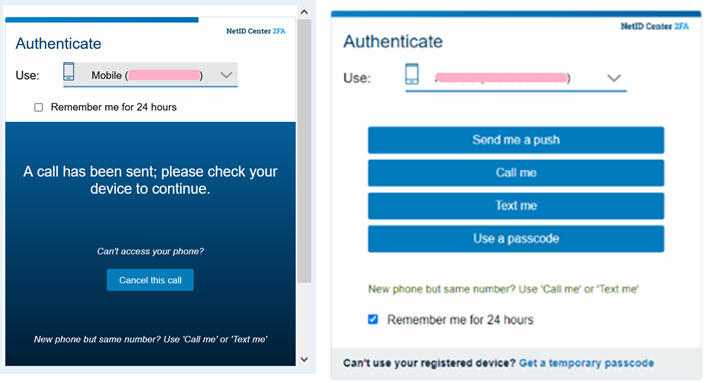
Depending on the options you selected when you initially set up your device in Duo, your steps to make a change to another authentication method will vary. The simplest way to ensure uninterrupted access is to begin with a test. Navigate to the NetID Center website at identity.uillinois.edu and click the blue “Log in” button.  After entering your NetID and password, you will see a NetID Center 2FA screen like one of these below:  

	You will see the screen on the left if you selected "Automatically Call" at original set up. You will see the screen on the right if you chose "Ask me how to authenticate" at original set up.

If you have a smartphone or basic mobile

If your device is capable of receiving SMS text messages, but you do not see the “Text me” button as above, you’ll need to set up your device again within the Duo registration system. You will set up the same phone number. 

Once you’re signed in to the NetID Center, click the “Manage my 2FA” button under the 2-Factor Authentication heading. Then click the “+ Add a new device” button at the bottom of the ‘My Devices & Settings’ section. 

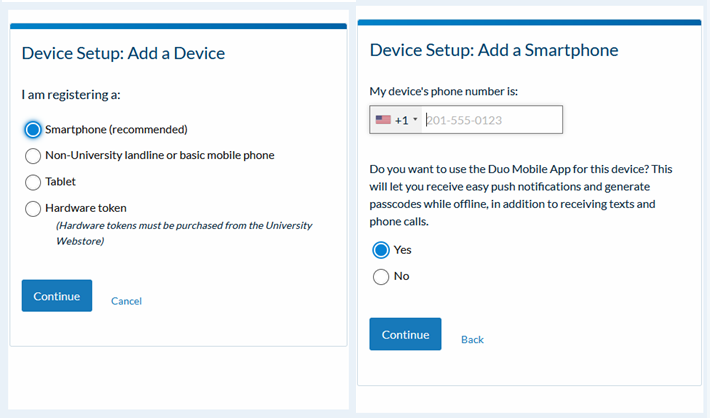
Select “Smartphone (recommended)” – THIS MUST BE DONE FOR ANY SMS-CAPABLE PHONE NUMBER, EVEN BASIC MOBILE PHONES

Screens you will see when setting up a device in Duo.

Select “Yes” after entering your number and follow the prompts to scan the QR code using your phone’s camera. 

Everyone, even basic mobile users, should select “Yes” at the phone number input screen. After entering your number, follow the prompts to scan the QR code using your phone’s camera. You may be asked about replacing the device – this is intentional and should be allowed. 

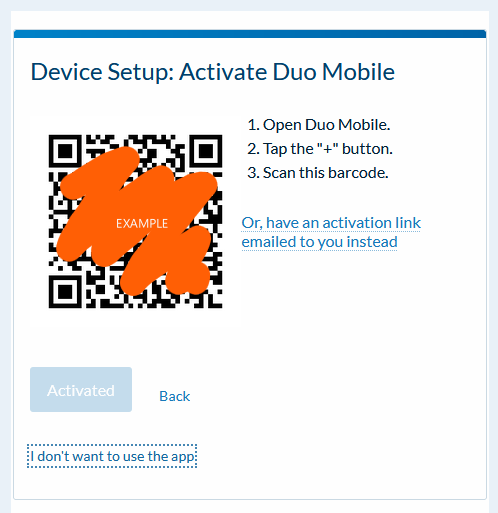
If you have a basic mobile phone, you can select not to use the app once you reach this screen.

QR code screen for Duo set up.

Landline only users

If the phone number you use for authentication is a landline that cannot receive an SMS text message, you will need to acquire a hardware token to replace it as your second device. These are available from the WebStore. Check with your unit HR or IT groups to determine their policy for providing them to employees. They may be purchased either by units or individuals.  

More information about purchasing and configuring hardware tokens can be found in this help article: https://answers.uillinois.edu/illinois/2fa-token 

Need help?

If you’re having trouble replacing your 2-factor authentication device to enable text messages or the Duo Mobile app, or you have any other questions about this change, please contact the Technology Services Help Desk by email at consult@illinois.edu or by phone at 217-244-7000.

Students: Multi-factor Authentication Required for Microsoft Office 365 Applications Starting 9-28-22

I do not currently have the Duo application or use multi-factor authentication for any university applications. What do I need to do?

  • Enroll your account in Duo by clicking the Set up 2FA button in the NetID Center, or by clicking the next button in the “Welcome to Duo Security” prompt screen. 
  • Follow the on-screen prompts to add a smartphone, traditional cell phone, or other device to use as your second factor while signing in. 
  • Install and set up the Duo Mobile app to make use of push notifications rather than phone calls or text messages for an easier and quicker login experience. 

    How to Set Up 2FA
    How to manage your devices

I already use the Duo application. What do I need to do?

If you see a Duo screen and are able to authenticate when logging in to protected University applications such as financial aid or payroll, you do not need to take any action. You will begin to see a new screen prompt before you can access Microsoft Office 365 applications such as email and it will work similarly. 

What is multi-factor authentication?

The university uses two-factor authentication (2FA). It is an electronic authentication method in which a user is granted access to a website or application only after successfully offering two pieces of evidence (factors): knowledge (something only the user knows), possession (something only the user has). A password is what you know, a device is what you have. The university’s 2FA provider is Duo for MFA.

Why is it important?

Bad actors have unfortunately been targeting UIUC students with troubling frequency lately. This change will help you and our great university minimize the disruptions and phishing attacks we see so often these days. It can help protect both your personal data and University data from being accessed and used by unauthorized parties who may have discovered or stolen a password.

Questions?

The help desk is available if you need assistance or additional information. Contact consult@illinois.edu or call 217-244-7000, or help.illinois.edu.

Privacy & Cybersecurity
Digital Computer Lab
1304 W. Springfield Ave.
Urbana, IL 61801
Email: securitysupport@illinois.edu
Log In