News

Data Privacy Week: Managing the Story of You

Data Privacy Week is the perfect time to review the data about you that is shared with others and to make choices about what data is collected and shared.

Your data is the story of you: what you look at online, your health and financial picture, where you go, and much more.

The National Cybersecurity Alliance encourages everyone to think about their data and data privacy during the final week of January. (Jan 22-28, 2023)

Here are some tips from the National Cybersecurity Alliance you can use as you think about your own data during Data Privacy Week.

University of Illinois data tools and protections are a result of national and state law and university policy, as well as best practices. Laws and policies dictate allowable levels of data access and sharing. Find out more about data at the University of Illinois.

Members of the university community who wish to dive in deeper to issues surrounding data privacy are invited to attend the Privacy Everywhere Conference from 9 AM to 3 PM on Friday, January 27. Registration to attend online can be found at this website.

Building Digital Trust

Whether you think about it daily or not at all, decisions about privacy affect our professional, educational, and personal lives.

  • What steps are the University of Illinois and other Big Ten Schools taking to protect your privacy?
  • What should you know about privacy law at home and abroad?
  • What harms might be caused by current data collection practices?
  • What are students’ ideas regarding privacy?

These are among the topics for the Privacy Everywhere Conference: Building Digital Trust taking place January 27, 2023.

The in-person conference with streaming available will cover the university’s privacy goals of trust, transparency, and consent and how they affect you.

Attendees can choose from two tracks:

  • Track A: What the University is Doing for Privacy (Spotlighting University Initiatives/Activities) 
  • Track B: Privacy and You: Understanding Privacy Issues  

With a breadth of topics, conference attendees will leave with a better understanding of privacy and privacy policy including legal, ethical, and industry perspectives, noted conference organizer Sheena Bishop.

“Technology Services is expanding privacy services and we have a growing team of professionals eager to share resources and knowledge with the university. We are policy experts and privacy evangelists, and we can walk you through potentially complicated issues in your unit or with your research,” Bishop said.

Helping the campus community better understand privacy issues also is part of the privacy team’s charge, Bishop explained.

“We are excited to have so many experts at our own university, and we are happy to welcome presenters from around the country to share their work to help us better understand the future of privacy in higher education, law, and beyond at this year’s conference,” she said.

One of this year’s presentations will be led by Sara Geoghegan, Counsel at the Electronic Privacy Information Center (EPIC). She will share the unique issues involved with location data – its collection and use.

When we use an app or any device, so much personal information is collected and processed, and it proliferates up the data chain almost instantly. This is a double-edged sword, according to Geoghegan. Individuals should and do expect a certain amount of data collection when using apps and devices. “We expect it to be used in certain ways. And that expectation reflects the original purpose for which it is collected. For example, when you are using a map app, you expect that app to use location data to provide you directions or to optimize the route. You do NOT expect data about our real-time location to be sold or exchanged to a data broker to advertise to you in unrelated ways,” Geoghegan pointed out.

The United States has a patchwork of laws, but not general comprehensive privacy legislation. She indicated how this can be a problem. “You can tell a lot about people when you aggregate that location information: their religion, political affiliation, health, can all come to light when a data broker or bad actor can access your location so easily.”

EPIC is focused on privacy in a lot of ways, including data security, AI and human rights, algorithmic fairness, surveillance, the privacy of minors, and more. “In the last few months to a year, I think that people who have not worried about privacy before are starting to realize these concerns. Privacy is something that EPIC has worked on for 28 years, but it is popular concern. I feel strongly that one person should not have to understand complex data eco systems or legalese-filled privacy policies,” Geoghegan added.

Conference registration, session information, and presenter biographies are at 2023 Privacy Everywhere.Privacy Everywhere: Building Digital Trust
Friday, January 27, 2023
9 AM to 3 PM
Beckman Institute for Advanced Science and Technology, Rooms 1005 and 1025
405 N. Mathews Ave. Urbana, IL

Ho Ho Hold the Phone

The holiday season comes with an increase in celebrations, meals, gatherings, and more. And it also comes with an increase in the risk of scam attempts—for individuals of all ages and backgrounds.
Holiday Scams — FBI

Scams can come via email, phone call, text, and other digital means. And they can come to university or personal accounts.

Be aware of the many types of scams that target students, including law enforcement scams, tax scams, tuition scams, immigration scams and shipping scams.

Phishing is among the most common ways that individuals may be caught in a scam. Learn more about how to prevent phishing at https://cybersecurity.illinois.edu/protect-my-personal-data/be-aware-of-threats/phishing

The University of Illinois Division of Public Safety offers tips regarding scam safety and keeps a log of recently reported scams. Scams – Public Safety (illinois.edu)

The University of Illinois’ International Student and Scholar Services also provides a resource with information to help you identify scams and stop them before they start.

Scam Safety | International Student and Scholar Services (illinois.edu)

Their advice includes these tips for avoiding scam calls:

  1. If you do not recognize the number or are not expecting a call (or a text message), do not answer. If it is important, they will leave you a message.
  2. If you do pick up the call and do not recognize the person, hang up the phone! Callers can be very persuasive and scary. Do not stay on the phone with them.
  3. Do not give any personal information out to anyone you do not know.
  4. Call the University of Illinois Police Department (217-333-1216) to report the fraud attempt.

App Security for National App Day and Beyond

Do you use apps on a smartphone, tablet, or wearable device? You probably do! “App” is short for “software application.” That means the apps we know and love on our mobile devices are all different pieces of software. There are more than two million apps, with more being added to app stores all the time.

National App Day is December 11, and it celebrates the applications we use to connect, work, shop, and play on our mobile devices. In honor of National App Day, take these steps to protect your apps and the mobile devices they live on.

Keep Tabs on Your Device

The biggest risk to your apps and device is most likely carelessness. The first thing to do to protect your device is to keep it with you in public. Don’t leave it unattended. When you’re not using it, store it in a closed bag or an inside pocket.

Update Apps Automatically

Turn on automatic updating on your devices, so they’re always running the latest version of whatever operating system and apps you use. Attackers are always looking for new weaknesses in software, and vendors are constantly releasing updates and patches to fix them. Keeping your apps up to date makes them much harder to hack.

Apple regularly updates devices, but Android mobile devices vary by device, manufacturer, and mobile carrier. For example, if you got an Android phone through T-Mobile, check the T-Mobile website for update information. Check out this helpful article on how to update Android apps: https://support.google.com/googleplay/answer/113412?hl=en

If you use an Apple device, follow the instructions here to turn on automatic updates: https://support.apple.com/en-us/HT202180

Connect With Caution

Public wireless networks and hotspots are often convenient, but rarely secure. Anyone could potentially see what you’re doing on your mobile device while you’re connected. Scammers can also set up fake Wi-Fi networks in public places to harvest information from anyone who joins the network. 

Be cautious when it comes to public Wi-Fi: limit what you do on public Wi-Fi, and avoid logging in to email or financial accounts via a public Wi-Fi network.

Protect With PINs, Passcodes, or Biometrics

Protecting your mobile device and apps is easy with a PIN, a passcode, or biometrics. These lock your device so that others can’t use it. The strongest level of protection is a biometric identifier, like your fingerprint or your face. If you use a 4-digit PIN to protect your device, consider changing it to a 6-digit PIN.. An alphanumeric passcode, or a mixture of letters and numbers, is even stronger.

No matter what apps you use, you can keep enjoying them safely with the suggestions above. Happy App Day!

Cybersecurity Champions: Leading by Example

Cybersecurity Champions make our campus community a little more cyber safe.

The “Cybersecurity Champions” program began in January 2022 with the goal of making our campus community a little more cyber safe.

Champions participate in monthly challenges designed to raise awareness broadly of privacy and cybersecurity issues and more specifically at the University of Illinois.

Participants are asked to encourage their coworkers to complete their online quarterly cybersecurity training, post information, or share information in team spaces with important cybersecurity messages. They also act as eyes and ears and can share questions or concerns related to cybersecurity back to the team at Technology Services.

Erin Metz is a member of the inaugural group of champions. She believes cybersecurity is an issue that she’s happy to help her coworkers with.

“I’m sure we have all been exposed to spam emails, lately more frequently, which is both frustrating and annoying. I’m here to help spread awareness. People of my generation were the first to have the internet. I think in general we have a good idea of what not to click, and I am happy to help others see that too,” she said.

Metz finds videos for the cybersecurity training program informative and funny, and they have been a good jumping off point for engaging others in the office with cybersecurity concepts.

“I particularly liked the training to create unique passwords. That one hit home the most. There was a lot of interest from others in my unit in figuring out how to use real words for passwords that are put together in a way that makes sense to them but are hard for others to figure out. I found that topic created a lot of good conversation,” Metz said.

Metz works in the Office of the Vice Chancellor for Diversity, Equity, and Inclusion, where she helps individuals with disabilities make their office work for them so that they can work safely and in the most productive way possible.

“We are in a fairly new office and several units occupy the same floor. We can spend a lot of time going back and forth to other locations within the office and are away from our desks during those times. A cybersecurity goal for our work group was not to leave information out in the open—to lock your computer when you walk away to prevent anyone walking past from seeing it, she said.” That was a simple fix that has made a difference in their level of security.

Metz also pointed out how pleased she was that the report spam button was introduced in Outlook email. “Having that feature is important. And my biggest takeaway is to get others to use that button and to just not click on things that do not look legitimate,” she noted.

Cybersecurity Training Specialist Sandy Bone says the program is geared towards those with no background in computers or cybersecurity. “One of our goals for the program is to engage with people across all of campus,” she said.

The monthly challenges provide ways to learn even more about cybersecurity best practices, share cybersecurity messages with coworkers, and earn prizes.

Champions receive a newsletter that contains their monthly challenge and additional information about things happening with the Cybersecurity Training and Awareness Team and more broadly with privacy and cybersecurity on campus.

Those who complete the challenges receive the month’s incentive giveaway item.

“The giveaways are really nice. And I already mentioned the videos are good. I would recommend that anyone who comes on board with the champions program take more of the training. The videos are short and effective,” Metz added.

Interested in learning more about the 2023 Cybersecurity Champions program? Staff and faculty will see application information in the November 2022 Work Secure newsletter. Or contact Sandy Bone at sandrad3@illinois.edu.

Opening a Window onto High School Cybersecurity Education

How can current and future generations help to ensure that technologies are created and used ethically? One way is effectively teaching students about cybersecurity and AI ethics. Associate Professor of Information Sciences Yang Wang and colleagues from the University of Illinois and other universities are interested in the topic and have been conducting research into how to improve instruction. Notably, their research team also has two high school students.

In online interviews, 16 U.S. high school teachers and several high school students shared their experiences in teaching and learning cybersecurity and AI ethics.

Findings about what topics high school teachers cover, the strategies and resources they use, and challenges they encounter were released in their paper, “How technical do you get? I’m an English teacher”: Teaching and Learning Cybersecurity and AI Ethics in High School.

The research is set for presentation at a premier international conference on computer security in early 2023. [IEEE Symposium on Security and Privacy 2023 (ieee-security.org)

A fundamental goal of cybersecurity ethics education is to prepare future decision-makers in the realm of cybersecurity. “This is an area where multiple ethical frameworks converge on issues including fairness, balancing the ‘good’ versus harm or risk, and the protection of innocent parties,” the researchers noted.

Teachers shared their struggles to inspire “an appropriate level of awareness and concern in their students in topics like cyber hygiene, personal autonomy, and data privacy.” Many teachers in the study described students’ overconfidence in their own ability to spot threats. Teachers also expressed that their students lacked awareness regarding online information, which can leave a person vulnerable to mis- and disinformation.

Teachers varied in their opinions about the reasons behind their observations. While some pointed to naivety, one teacher said:

“I think that’s something that takes a lot of time and understanding to develop, to think about how you participate within systems and how systems influence you […]. That’s a developmental thing. I don’t think it’s naive.”

Wang and colleagues concluded that their initial study demonstrates a need for more and better-quality cybersecurity/AI ethics instruction and that more research is needed to investigate their findings with larger samples and across broader swaths of the U.S. educational system.

Further, they recommend that “it would also be helpful to delve further into how teachers can best introduce AI/CS ethics into already-packed curricula.”

Wang and colleagues point to the fact that much current cyber education is grounded in ‘don’t-do-this-isms’. And that students seem to immediately tune out such messages. Not wanting to be lectured to by adults is one reasonable explanation for a certain level of apathy.
 

Provide more tools for teachers and make them integratable

Wang explained that from the interviewed teachers’ perspective, a common theme was a lack of tools or of support to allow teachers to cover cyber hygiene. While some cybersecurity education resources exist, it takes time to discover them. And then once discovered, it often is not easy for educators to incorporate them into curriculum.

Make it relatable and include students in the teaching

Wang explained that his colleagues are working on the next phase of research, which is helping to create the resources teachers want and students will engage with.

They conducted a workshop at a local high school where they designed a set of hands-on labs to educate students about privacy and security issues. Students were asked to create a public announcement or a short summary of a cybersecurity issue.

“It was fun to see students create different announcements. Evaluations afterwards showed that the students liked that activity. They had to use what they learned and then present it themselves. Only if you can teach something, does it show you understand it. Students know the ways that the content will be engaging for their peers,” Wang said.

“Teachable moments” can make a difference

“Our university is doing a great job creating a lot of education materials and short lessons. However, I think a lot of times people brush the ideas away because cybersecurity’s not a main concern in their daily life. When you go online your main task might be making a purchase, etc.,” Wang said.

Wang explained that there are some very good materials that train college students, yet they are usually for students in the STEM field.

“Arguably each student should have an awareness of these issues. The challenge is how to educate students in disciplines who don’t take computer classes,” he noted.

Wang believes what he and his colleagues learned from their work can be applicable to colleges. Teachers like to use recent events to illustrate things. Resources that allow teachers to easily use recent events as a springboard will be a good technique, he noted.

Wang teaches classes in computer security and in user experience and data science, and as he has started to mention current events in his instruction it catches people’s attention. “It’s a way to bring up these issues in non-CS classes. I use examples from this research [the examples that high schoolers created] in my own teaching. Students then immediately know what I am talking about.” he explained.

“Think about teachable moments. When cybersecurity events happen in the world, people are more likely to spend time on them. When you deliver and how you deliver them can build on real world events. That’s a good strategy,” he said.

Keep Learning and Stay Aware

Training and Vigilance Kept This Employee from Getting Scammed

Like most of us, Alissa Jones does not work in cybersecurity. Prior to coming to work at the University of Illinois, the cybersecurity training she received was word of mouth, and it contained only simple advice like, protect your password.

The quarterly cybersecurity training for UIUC employees has broadened her knowledge and ability to keep her personal and professional data safe.

And Jones says she was ‘saved’ by completing online cybersecurity training and the heightened awareness because of it. She shared her almost-incident with the Cybersecurity Training and Awareness Team.


“I literally got a call this morning during a meeting, and the voicemail was about ‘my student loans’ that I thought was real. I was going to call back over lunch, but after taking the module, it made realize the voicemail was likely a scam.

 Sure enough, I did some research on the phone number they left me to call back before calling, and it confirmed it was a scam call.

I don’t know what headache you all saved me from if I had called them back, but you definitely saved me!!!”


Jones is a Visiting Instructional Design and Technology Coordinator in the College of Education, so has years of experience with training and how it is delivered and received.

“Working in education I think about how people learn,” she said. And she noted how she appreciates the ways that cybersecurity trainings consider different learning styles. “For me, it’s best to read something and have a reference to it.” Others have different preferences, such as listening to training or practicing something new to learn it.

“They do a good job of highlighting the everyday issues. Some I didn’t even know were an issue. It provides new information to me,” she added.

“You don’t know what you don’t know. The trainings make me feel more confident and secure about how to follow up. I now know how to report things. And training gives you the tools you need if something seems off.”

Training helps with your professional life

Cybersecurity modules demonstrate what to look out for, and Jones found it easy to apply what she learned.

Scammers take advantage of inattention and of our tendency to gravitate toward the familiar. Jones appreciated the reminder to be vigilant.

“Working at the U of I, your name is out there. My email is tied to a conference website. I get emails from people looking to help us plan our conferences. I am more sensitive about looking at those emails because they could be phishing. I also do more research. Like for U of I emails, if I don’t know them and if I can’t find that person in the UI directory, then it might be phishing.”

Cybersecurity training provides help with digital life beyond the university

Training also helped her to be aware of messages from recognizable entities.

Scammers can use a variation of the email by changing a dot or a letter. Unfortunately, this scam happened to her mom. “She received an email about a ‘going out of business’ sale from a store she knew was closing. She visited the website and noticed the shopping experience was different. She went ahead and bought her items, and then sent me the email about the sale. I looked at the email address and based on the training I realized it was likely a scam. (Over time we learned it definitely was a scam!) But because of my training, she was able to report the fraud quickly to her bank and hopefully help others.” Jones said. Anyone with a valid University of Illinois email address can take cybersecurity training at https://go.uillinois.edu/securitytraining.

Complacency can result in compromise

It can happen to anyone, and training is a wonderful way to stay ahead of scammers with bad intentions, Jones noted.

“Don’t brush off the training. I work a technical job and am careful, but things are getting so sophisticated, it is hard for even an expert. Keep learning and stay aware.”

Ask Me Anything: See Yourself in Cybersecurity

October 19, 2022 Ask Me Anything

Live on October 19 Our celebration of Cybersecurity Awareness Month continues. Join members of the Identity, Privacy, and Cybersecurity Team at Technology Services for an Ask Me Anything on Reddit. Panelists will be on hand to answer questions about university cybersecurity and share some varied and interesting individual paths taken to successful work in the cybersecurity field. Join us on the University of Illinois Subreddit.

Students: Multi-factor Authentication Required for Microsoft Office 365 Applications Starting 9-28-22

I do not currently have the Duo application or use multi-factor authentication for any university applications. What do I need to do?

  • Enroll your account in Duo by clicking the Set up 2FA button in the NetID Center, or by clicking the next button in the “Welcome to Duo Security” prompt screen. 
  • Follow the on-screen prompts to add a smartphone, traditional cell phone, or other device to use as your second factor while signing in. 
  • Install and set up the Duo Mobile app to make use of push notifications rather than phone calls or text messages for an easier and quicker login experience. 

    How to Set Up 2FA
    How to manage your devices

I already use the Duo application. What do I need to do?

If you see a Duo screen and are able to authenticate when logging in to protected University applications such as financial aid or payroll, you do not need to take any action. You will begin to see a new screen prompt before you can access Microsoft Office 365 applications such as email and it will work similarly. 

What is multi-factor authentication?

The university uses two-factor authentication (2FA). It is an electronic authentication method in which a user is granted access to a website or application only after successfully offering two pieces of evidence (factors): knowledge (something only the user knows), possession (something only the user has). A password is what you know, a device is what you have. The university’s 2FA provider is Duo for MFA.

Why is it important?

Bad actors have unfortunately been targeting UIUC students with troubling frequency lately. This change will help you and our great university minimize the disruptions and phishing attacks we see so often these days. It can help protect both your personal data and University data from being accessed and used by unauthorized parties who may have discovered or stolen a password.

Questions?

The help desk is available if you need assistance or additional information. Contact consult@illinois.edu or call 217-244-7000, or help.illinois.edu.

Login Screen Changes Start Aug 12

If you are experiencing trouble logging in to email and Canvas, you may need to:

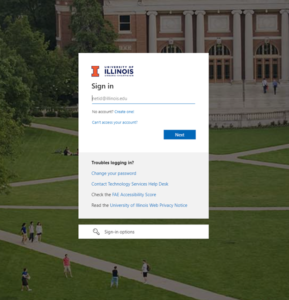
-Login using your complete email address, “netid@illinois.edu”

-Update an outdated bookmark for UIUC services or update an outdated browser, application, or device operating system

Please visit the following article for more information and troubleshooting assistance. https://answers.uillinois.edu/illinois/page.php?id=120603=3

sign in screen for Illinois login

On the first screen, type in your entire university provided email address. You will no longer be able to enter only your NetID for access. Please update your password managers accordingly.  

For more information about the login screen see this page Identity Management, Urbana Single Sign-On Pages (uillinois.edu)

New Duo login screen experience as of Aug 12,  2022

The Duo screen will appear after successful entry of your email address and password. This is a visual change that requires no new or different action on your part. Continue to login with Duo as you have in the past. 

For more information about the new Duo prompt, visit 2FA, Duo Universal Prompt Overview (uillinois.edu)

Privacy & Cybersecurity
Digital Computer Lab
1304 W. Springfield Ave.
Urbana, IL 61801
Email: securitysupport@illinois.edu
Log In